

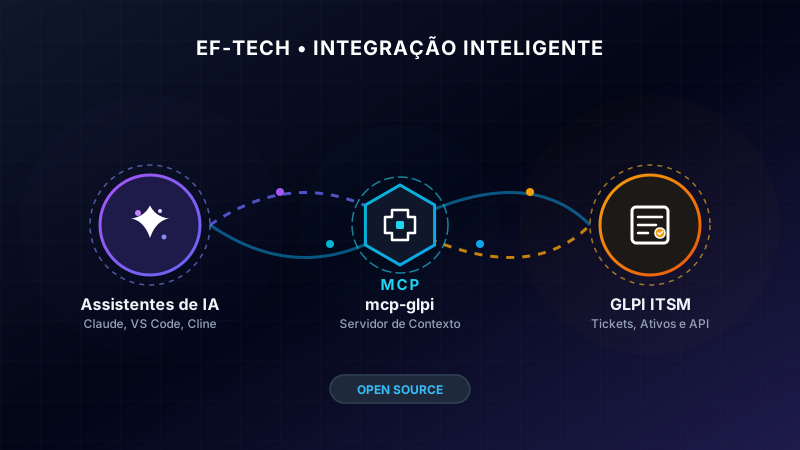
EF-TECH is proud to announce mcp-glpi, an open-source server that implements the Model Context Protocol (MCP) to expose the entire GLPI ecosystem to AI assistants such as Claude, Cline, GitHub Copilot, and any other MCP-compatible client.
What is MCP-GLPI?#
MCP (Model Context Protocol) is an open standard by Anthropic that allows AI assistants to connect to external systems securely and in a structured way. mcp-glpi is the bridge between this protocol and GLPI — the most widely used open-source IT service management (ITSM) platform.
With it, you can ask an AI assistant in natural language:
- “List open high-urgency tickets”
- “Create a ticket reporting that the database server is at 95% CPU usage”
- “Show me João’s computer data”
- “What is the total asset count in the inventory?”
- “Add a follow-up to ticket #42 stating the issue has been resolved”
All without leaving your favorite AI assistant.
Key Features#
The server exposes 84 MCP tools and 9 resources organized into the following categories:
Ticket Management (Full ITIL)#
| Area | Tools |
|---|---|
| Reading | List, get details, timeline, follow-ups, tasks, solutions, validations, documents, satisfaction, overdue tickets (SLA) |
| Writing | Create, update, delete, add follow-up, add task with time tracking, add solution, assign ticket, link tickets, request validation, approve/refuse validation, attach document |
Problems and Changes#
- List, get, create, and update problems
- List, get, create, and update changes
Asset Management#
- Computers: list, get (with software, network ports, connections, documents), create, update, and delete
- Software: list, get, and create
- Network Equipment: list, get, and create
- Printers: list, get, and create
- Monitors: list, get, and create
- Phones: list, get, and create
Knowledge Base, Contracts, Suppliers, and Locations#
- List, get, and create knowledge base articles (with text search)
- List, get, and create contracts, suppliers, locations, and projects
Users, Groups, and Categories#
- List users, search by login, create user
- List and create groups, add user to group
- List ticket categories
- List entities
Statistics and Introspection#
- Ticket counts by status (with entity/period filter)
- Total assets by type
- Ticket distribution by status, category, technician, entity, or month
- Searchable field catalog
- Active session information
Resources#
Beyond tools, the server exposes resources in the glpi:// format:
glpi://tickets/open— open ticketsglpi://tickets/recent— recent ticketsglpi://problems/open— open problemsglpi://changes/pending— pending changesglpi://computers— computersglpi://groups— groupsglpi://categories— categoriesglpi://stats/tickets— ticket statisticsglpi://stats/assets— asset statistics
Technology#
mcp-glpi is built with TypeScript and runs on Bun, offering:
- OAuth2 authentication with support for
password grant,client_credentials, andbearer token - Unified HTTP layer with automatic reauthentication on 401, retry on 5xx/429, and configurable timeouts
- Multi-criteria search with RSQL filters (
AND/OR/AND NOT/OR NOT), pagination, andfetch_all - Dynamic field mapping — translations between
field_idand names are cached with a 1-hour TTL - Resolved foreign keys — details return both the ID and readable name without additional queries
- Runtime input validation with Zod — clear errors instead of GLPI failures
- Security annotations —
readOnlyHinton query tools,destructiveHinton write/delete operations - Docker image based on
oven/bun:1-alpine, running as non-root user (bunuser:1001)
How to Use#
With Claude Desktop / Claude Code#
Add to your claude_desktop_config.json:
{
  "mcpServers": {
    "glpi": {
      "command": "bunx",
      "args": ["mcp-glpi"],
      "env": {
        "GLPI_URL": "https://glpi.your-company.com",
        "GLPI_AUTH_METHOD": "password",
        "GLPI_USERNAME": "your_username",
        "GLPI_PASSWORD": "your_password",
        "GLPI_CLIENT_ID": "your_client_id"
      }
    }
  }
}
With Docker#
docker pull ghcr.io/eftechcombr/mcp-glpi:1.0

docker run -i --rm \
  -e GLPI_URL="https://glpi.your-company.com" \
  -e GLPI_AUTH_METHOD="password" \
  -e GLPI_USERNAME="your_username" \
  -e GLPI_PASSWORD="your_password" \
  -e GLPI_CLIENT_ID="your_client_id" \
ghcr.io/eftechcombr/mcp-glpi:1.0Prerequisites#
- A GLPI instance (version 10 or 11) with API access
- An OAuth2 client configured in GLPI (Setup → General → OAuth2 Client)
- An MCP-compatible AI assistant (Claude, Cline, Continue, etc.)
Why We Built This#
At EF-TECH, we work with GLPI daily — whether in service desk operations for our clients or developing Docker images and Helm Charts for containerized deployment.
We noticed that AI assistants are becoming increasingly present in IT teams’ daily workflows, yet a direct connection between them and management tools was still missing. mcp-glpi fills exactly that gap: instead of manually copying and pasting information, the AI assistant queries and records data directly in GLPI.
Roadmap#
The server is already functional and in use, but we have several plans for evolution:
- Support for change approval workflows
- Custom reporting tools
- Expanded asset coverage (network devices, batteries, etc.)
- Integration with more assistants and IDEs
Contribute#
mcp-glpi is open-source under the MIT license and available on GitHub:
🔗 https://github.com/eftechcombr/mcp-glpi
Contributions are welcome! Issues, pull requests, and suggestions are open to the community.
Useful Links#
At EF-TECH, we specialize in GLPI, cloud computing, and IT infrastructure. We offer expert support for GLPI deployment, maintenance, and integration with modern tools. Contact us to learn how we can help your team.