

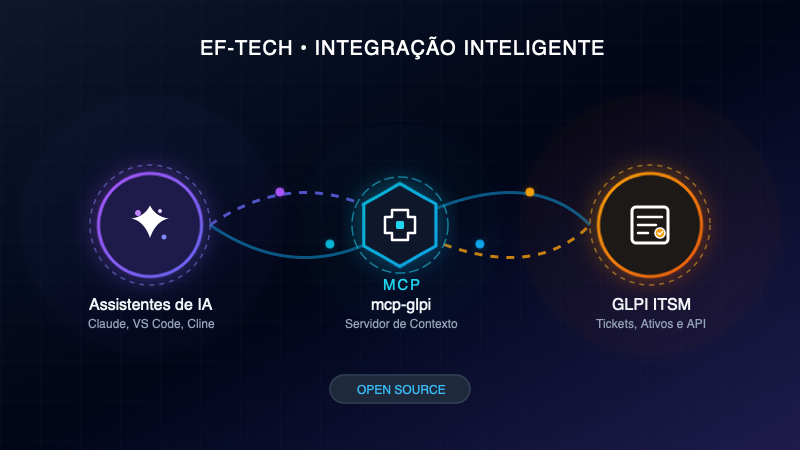
GLPI 12 moved its High-Level API to v3.0, and the MCP server that connects AI assistants to GLPI had to follow. On November 14, 2026, EF-TECH published mcp-glpi v1.2.0 (package version 3.5.0) — a release that makes API v3.0 the default target, keeps v2.x working for older GLPI installations, and fixes the compatibility bugs that surfaced along the way.
Release at a glance#
| Item | Value |
|---|---|
| GitHub release | v1.2.0 |
| Package version | 3.5.0 |
| Pull request | PR #12 — feat(api): prefer GLPI High-Level API v3.0 with v2.x compatibility |
| Merge commit | 13b1dc3 |
| Version bump commit | a31778a |
| Container image | ghcr.io/eftechcombr/mcp-glpi:1.2.0 (also 1.2, 3.5.0, latest) |
| Platforms | linux/amd64, linux/arm64 |
The server still exposes the same broad tool surface — 84+ MCP tools covering tickets, problems, changes, assets, knowledge base, contracts, suppliers, locations, projects, users, groups, categories, entities, documents, search, and statistics — with OAuth2 authentication, RSQL multi-criteria search, dynamic field mapping, resolved foreign keys, Zod validation, and MCP safety annotations. What changed in this release is the API contract underneath those tools.
Why the API version became configurable#
Until now, mcp-glpi targeted the GLPI High-Level API v2.3. That was the stable path while GLPI 11 was the common production version. GLPI 12 exposes v3.0, so keeping v2.3 as a hard-coded default would have meant either missing the new API surface on GLPI 12 or breaking every GLPI 11 deployment at once.
v1.2.0 solves that with a configurable target:
| Setting | Where | Default | Purpose |
|---|---|---|---|
GLPI_API_VERSION | Environment variable | 3.0 | Selects the High-Level API version for the server process |
api_version | glpi_configure_connection tool parameter | 3.0 | Selects the API version per session in multi-tenant HTTP mode |
apiVersion | glpi_connection_status response | — | Reports the resolved version actually in use |
The value passes through normalizeApiVersion, which validates and normalizes it before any request is made. That matters because a typo in an environment variable should fail loudly, not silently fall back to a different API surface. Supported targets are 3.0 for GLPI 12 and 2.3 / 2 for the v2.x line.
For a stdio setup, the version is just another environment variable:
{
  "mcpServers": {
    "glpi": {
      "command": "bunx",
      "args": ["mcp-glpi"],
      "env": {
        "GLPI_URL": "https://glpi.example.com",
        "GLPI_AUTH_METHOD": "password",
        "GLPI_USERNAME": "your_user",
        "GLPI_PASSWORD": "your_password",
        "GLPI_CLIENT_ID": "your_client_id",
        "GLPI_API_VERSION": "3.0"
      }
    }
  }
}
In multi-tenant Streamable HTTP mode, where GLPI_URL stays empty and each client brings its own connection, the same choice is passed to glpi_configure_connection as api_version. After connecting, call glpi_connection_status and check apiVersion to confirm which surface the session is using.
{
  "GLPI_URL": "https://glpi.example.com",
  "auth_method": "password",
  "username": "your_user",
  "password": "your_password",
  "client_id": "your_client_id",
  "api_version": "3.0"
}
The snippet above is the shape of the glpi_configure_connection arguments, not a file on disk. Credentials remain in memory for the session and are dropped when it ends or expires.
Compatibility fixes in v1.2.0#
Switching the default API version is the headline, but the release also fixes the concrete breakages found while testing against both API generations.
Itemtype paths: SoftwareLicense and Project#
ITEMTYPE_PATH_MAP translates MCP itemtypes into GLPI REST paths. Two entries were wrong and have been corrected:
| Itemtype | Path before | Path now |
|---|---|---|
SoftwareLicense | incorrect path | Management/License |
Project | incorrect path | Project |
Those two tools could not reach their resources reliably because the requests were built against paths that do not exist in the API. With the map fixed, software license and project operations resolve to Management/License and Project respectively.
Team shapes in scripts/smoke.ts#
The smoke test suite creates and inspects team membership, and the response key differs between API generations: v3.0 returns UserTeamMember, while v2.x returns TeamMember. The old check assumed a single shape, so it failed as soon as the default changed. scripts/smoke.ts now branches on the configured API version and asserts the correct shape for each one, which keeps the release gate meaningful for both GLPI 11 and GLPI 12 targets.
Session cleanup without /logout#
killSession() used to call a /logout route that the API does not support, producing errors during shutdown. It now clears the local bearer token and finishes cleanly, without pretending the server can invalidate the session remotely. The practical effect is quieter logs and a predictable teardown path for stdio processes and expired HTTP sessions.
Verification and release pipeline#
The release was validated end to end before publishing:
| Check | Result |
|---|---|
bun run lint | Passed |
bun run build | Passed |
bun test | 24/24 tests passing |
| GitHub Actions | GHCR Docker build & push for v1.2.0 |
The container workflow published a multi-arch manifest for linux/amd64 and linux/arm64, so the same image tag works on standard x86 servers, Apple Silicon laptops, and arm64 Kubernetes nodes.
Pulling the image#
docker pull ghcr.io/eftechcombr/mcp-glpi:1.2.0
# or track the release line / package version / latest
docker pull ghcr.io/eftechcombr/mcp-glpi:1.2
docker pull ghcr.io/eftechcombr/mcp-glpi:3.5.0
docker pull ghcr.io/eftechcombr/mcp-glpi:latest
Run it with the API version set explicitly, even though 3.0 is the default — it documents the target and survives future default changes:
docker run -i --rm \
  -e GLPI_URL="https://glpi.example.com" \
  -e GLPI_AUTH_METHOD="password" \
  -e GLPI_USERNAME="your_user" \
  -e GLPI_PASSWORD="your_password" \
  -e GLPI_CLIENT_ID="your_client_id" \
  -e GLPI_API_VERSION="3.0" \
  ghcr.io/eftechcombr/mcp-glpi:1.2.0
Keep -i and do not add -t: a TTY can corrupt the stdio JSON-RPC stream. The image runs as the non-root user bunuser:1001 on oven/bun:1-alpine.
Upgrading from 3.4#
The main behavioral change is the default target: GLPI_API_VERSION now defaults to 3.0 instead of v2.3.
On GLPI 12, upgrade and keep the default. No extra configuration is required.
On GLPI 11 or any instance without API v3.0, pin the old behavior explicitly:
GLPI_API_VERSION=2.3GLPI_API_VERSION=2is also accepted for the v2.x line. In multi-tenant HTTP mode, passapi_version: "2.3"toglpi_configure_connectioninstead.Verify after connecting with
glpi_connection_status; theapiVersionfield shows the resolved target.Update the container tag to
1.2.0,1.2,3.5.0, orlatest, and keep-iin MCP client configurations.
Nothing else in your client configuration needs to change. The itemtype mapping and smoke-test fixes are internal, and killSession() cleanup only removes an unsupported call.
Useful links#
- GitHub release v1.2.0
- Pull request #12
- Commit
13b1dc3and commita31778a - npm package
mcp-glpi - Container image on GHCR
- GLPI project and GLPI High-Level API documentation
- Model Context Protocol
- EF-TECH GLPI product page
At EF-TECH, we work with GLPI, cloud computing, and IT infrastructure — from container images and Helm charts to integrations like mcp-glpi. Contact us to talk about running GLPI 12 with AI assistants in your environment.